Rubrica
It’s 14:10. A contract worth 1.84 million needs your yes by 18:00, and your next meeting starts in twelve minutes.
A concept I designed on my own in November 2026. No client, and nothing here shipped. The people, companies, amounts and clauses are invented, and the screens are in Portuguese because I drew them for legal teams in Brazil.
Twelve minutes between two meetings
It’s Tuesday, 14:10. Your phone lights up in the corridor: legal review, due at 18:00.
The contract is for IT services, worth R$ 1.84 million over 24 months. It has 14 clauses and 3 annexes.The contract, the companies, the people and the amounts are made up. I wrote one contract and carried it through every flow, so the screens had to agree with each other.
You won’t read 14 clauses standing up. You also can’t approve blind.
You need three answers. What is risky? What changed since the last version? And what is yours to decide?
Fast approval turns into a rubber stamp
I spent years designing contract software made for a desk. The document sat in the middle of the screen, and the step to act on sat in a panel beside it.
People opened that same screen on their phones anyway, to unblock a contract between meetings. Designing mobile flows for that work taught me one thing: away from the desk, a screen has to open on what the person came to do.
Now add an AI that reads the contract first. Approving gets fast, which is the point. It also gets easy to say yes to whatever the machine summarised.
Researchers call this automation bias. A legal team has a plainer name for it: a rubber stamp. Rubrica is my answer to one question: how does approval get fast without getting empty?
Three rules before any screen
Before drawing anything, I wrote three rules, for the AI and for the interface.Three flows: approve a step, fill a form, send for signature. Three rules sit above them, and I went back to the rules every time a hard state came up. Every hard state I met later was settled by going back to them.
- The AI reads. A person decides. The AI points, quotes and explains. Approving, returning and signing always belong to a person.
- Certainty comes with a reason. No percentages. Each point says how sure the reading is, and why.
- Friction follows risk. A clean contract takes one tap. An open high risk takes a press and hold, and a statement of what was seen.
The screen opens on the decision
The notice already carries the step, the amount, the deadline and what is waiting. The screen behind it starts with the same things, then the points from the AI, each tied to its clause.
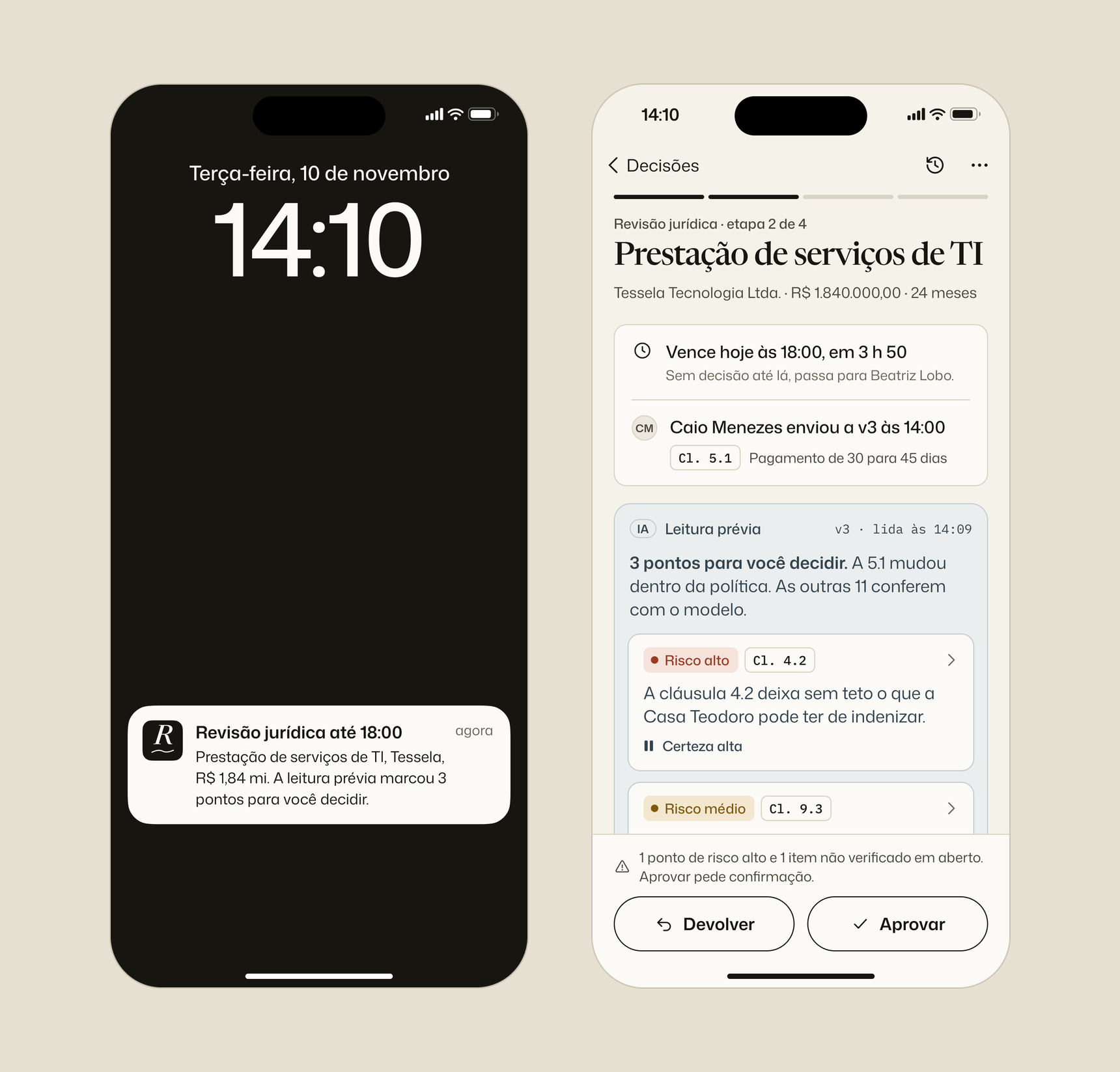
The notice and the screen say the same thing first: the step, the deadline and what is waiting for a decision.
- Note 1: The deadline also says what happens with no decision: the step passes to the coordinator.
- Note 2: The AI panel has its own colour and a plain “IA” tag, so nobody mistakes its words for a person’s.
- Note 3: The bar above the buttons says what is still open before anyone taps Approve.
One clause changed inside policy, and eleven match the approved template. The screen spends one line on those twelve, and the rest on the three points that need a person.
Every point leads to its clause
A point explains the risk in one sentence, quotes the company policy it comes from and offers new wording. One tap opens the contract at that exact clause.
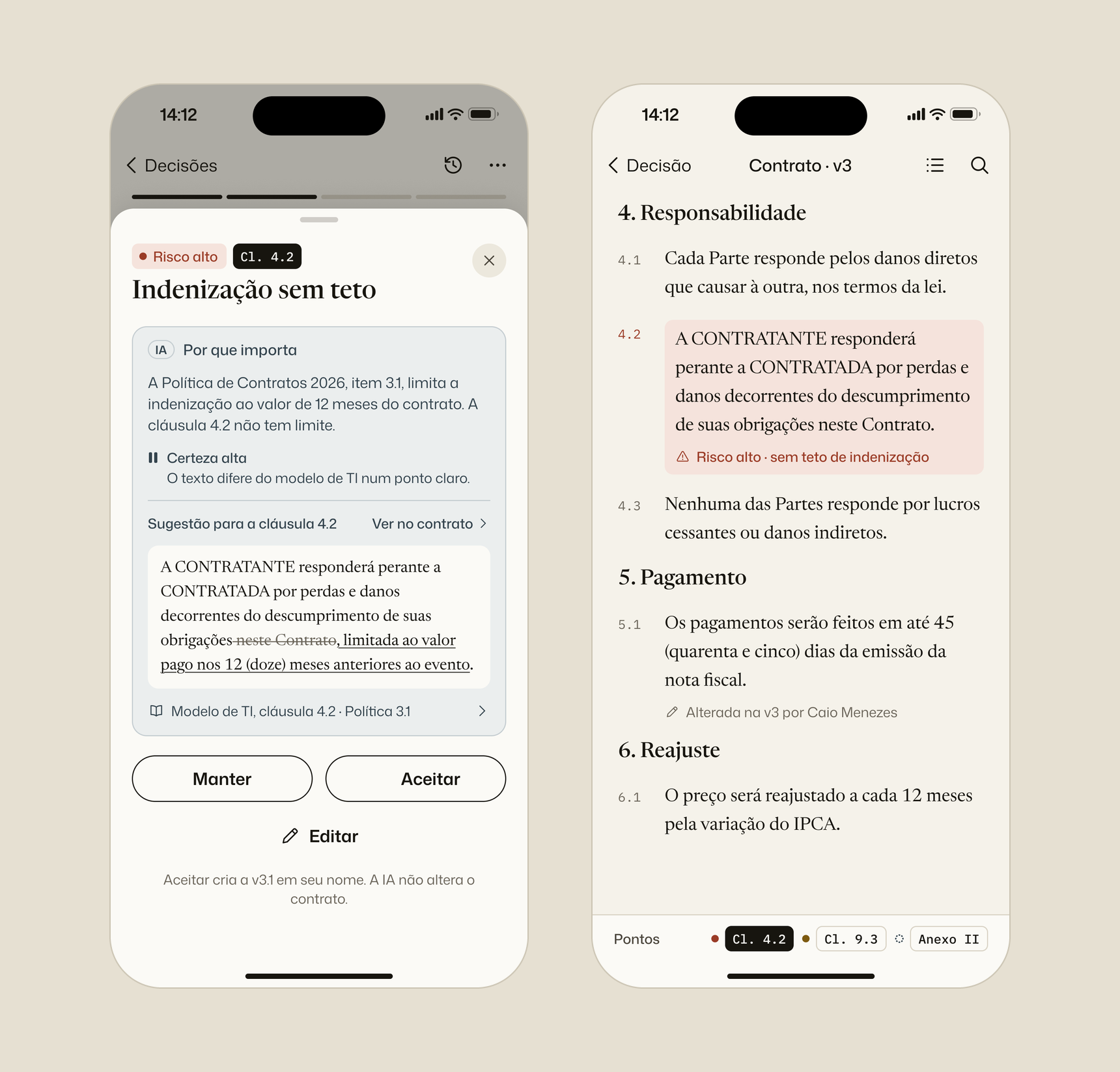
A point explains the risk, quotes the policy and offers wording. One tap opens the contract at that clause.
- Note 1: Certainty is a word with a reason under it, never a percentage.
- Note 2: Accepting creates a new version in the reviewer’s name. The AI doesn’t change the contract.
Accepting the wording creates a new version in the reviewer’s name. The AI never edits the contract.
When the AI can’t read, it says so
Annex II is a scanned page at low resolution. The AI can’t read its penalty table, so it says that and guesses nothing.
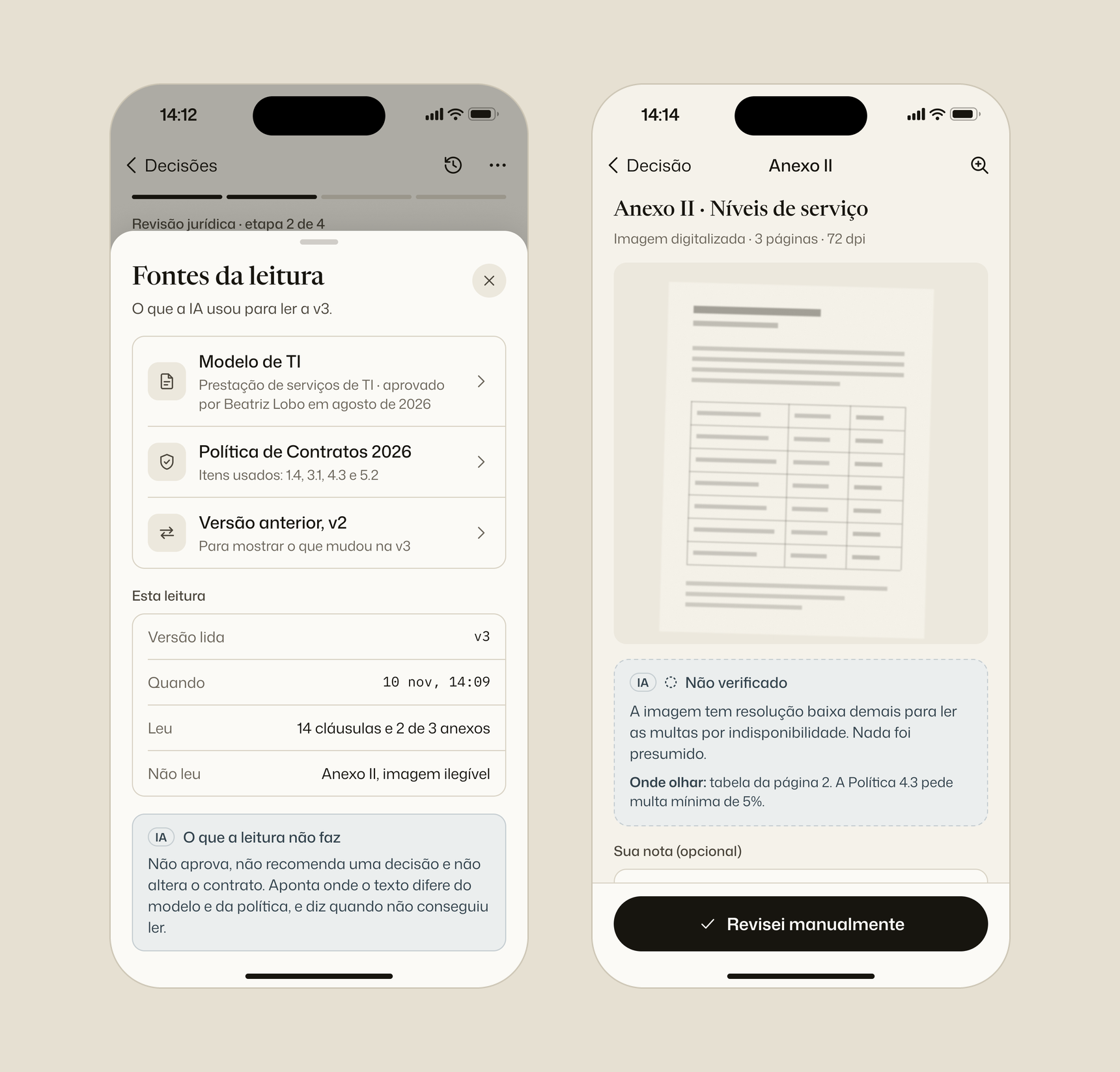
The sources show what the AI read, on which version, and what it could not read.
- Note 1: A fixed card says what the reading doesn’t do: it doesn’t approve, recommend a decision or change the contract.
- Note 2: The not verified note points at the page and the policy rule, so the manual review starts in the right place.
The reviewer reads the annex by hand and finds a 2% penalty where policy asks for 5%. An honest “I don’t know” sent a person to the right page.
There are two scales, and they are never added together. Risk comes from company policy. Certainty comes from the evidence of the reading.
Certainty has three values: high, medium and not verified. There is no low certainty. When the reading is weak, the AI steps back and says why.
A risky yes takes more effort
Returning a contract always costs the same: a reason. Approving costs more when risk is left open.
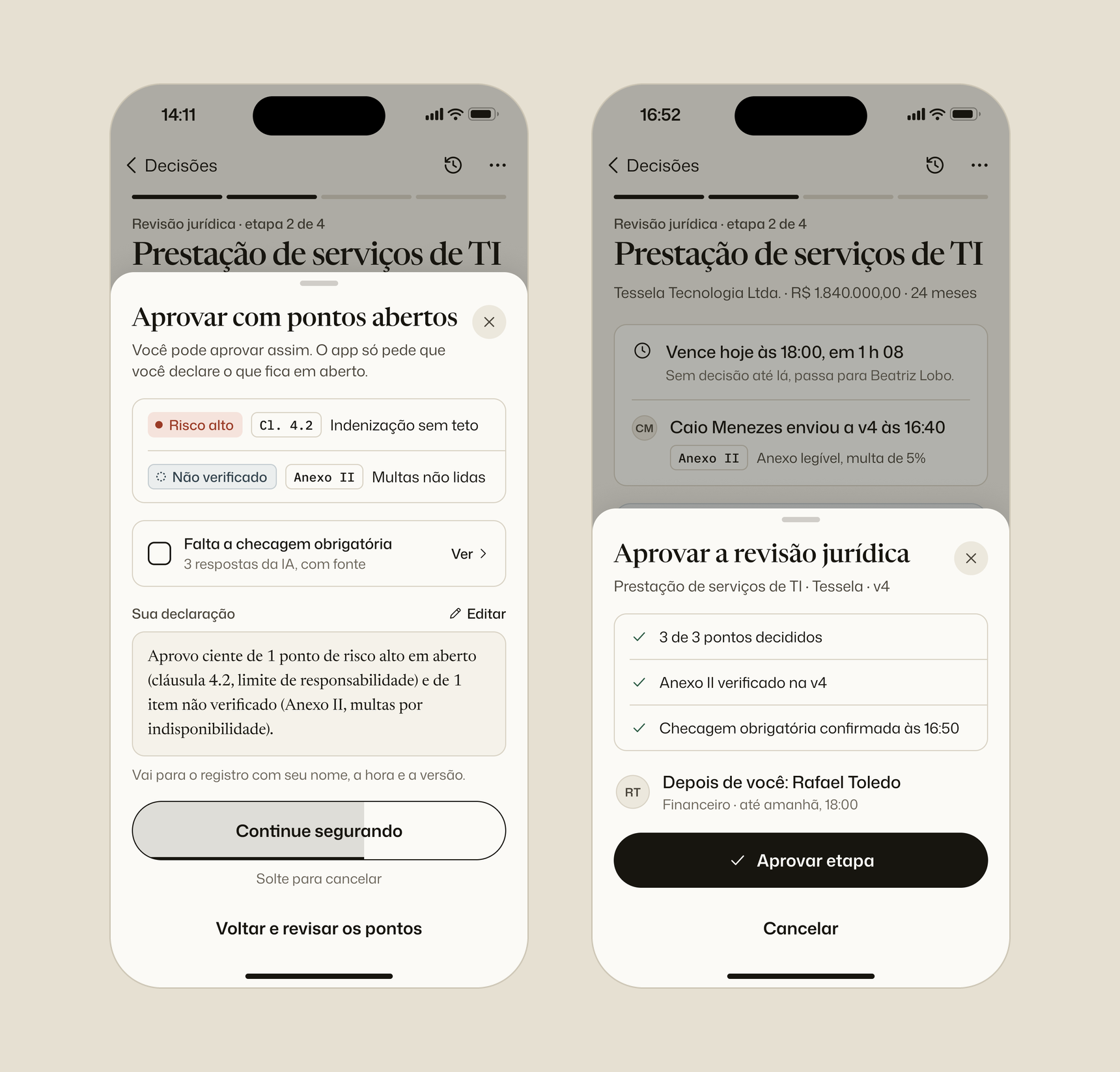
The same step, twice in one afternoon. With risk open, approving asks for a hold and a statement. With nothing open, it is one tap.
- Note 1: The statement is written for the reviewer and can be edited. It goes to the record with a name, the time and the version.
- Note 2: Releasing early cancels. Nothing is approved by accident.
With nothing open, approving is one tap and a confirmation. With a high risk point or an unverified item open, the reviewer presses and holds, and the statement names what stays open. With a screen reader, the hold becomes a confirmation step with the same statement.
I also wrote down what I chose not to do, and why.
- No percentages. A percentage looks exact and gives the reader nothing to check.
- No recommendation to approve. The AI suggests wording. The yes always belongs to a person.
- No blocked button. Blocking teaches people to tick “reviewed” without reviewing. The button asks for more, and never forbids.
Disagreeing with the AI costs one sentence
The reviewer keeps clause 9.3 as it is, against the AI, with one sentence of reason. Five minutes before the meeting, the contract goes back to its drafter: the penalty in Annex II is below policy.
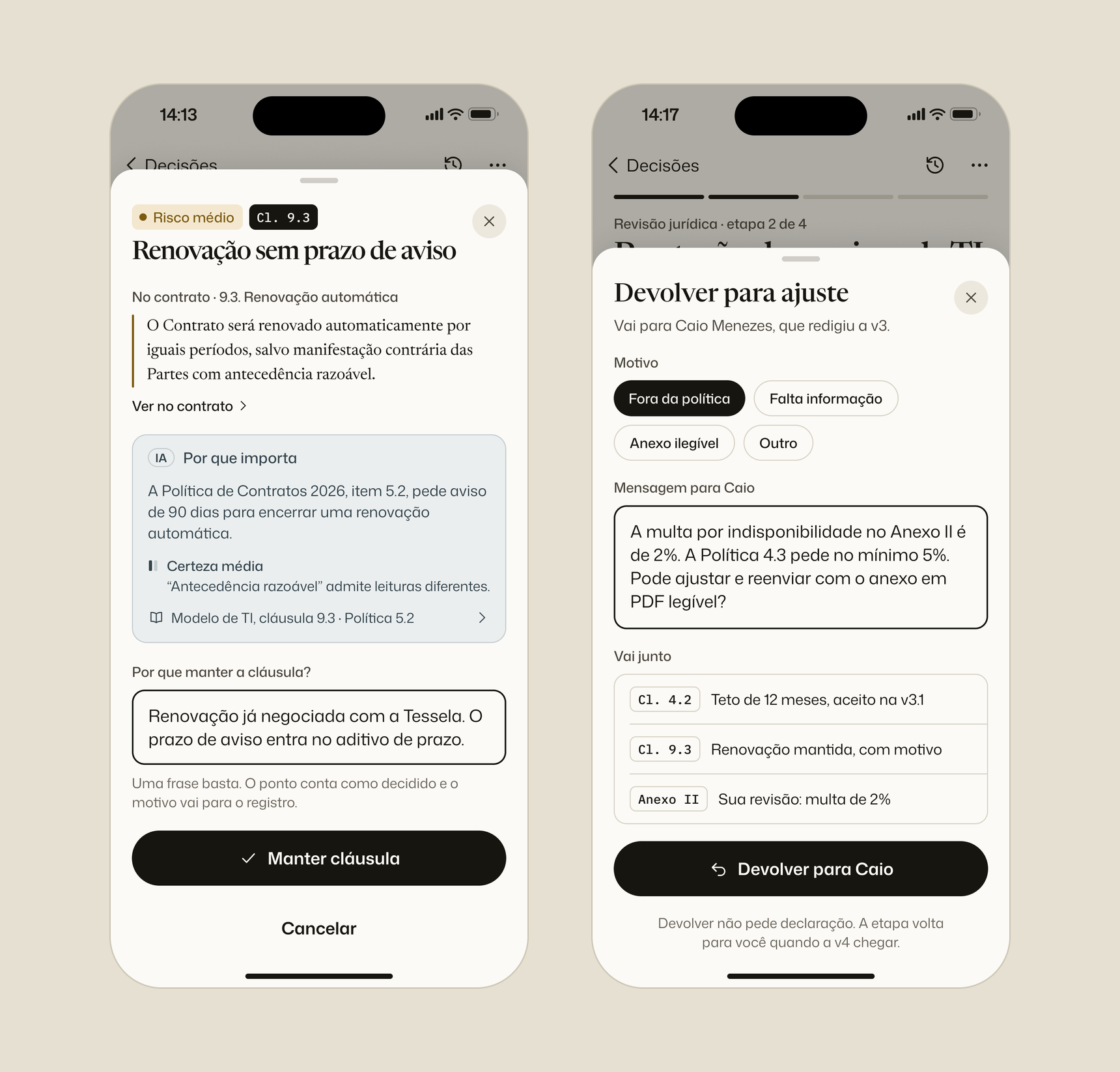
Keeping a clause against the AI takes one sentence. Returning the contract takes a reason, and the points travel with it.
The drafter gets the reason and the marked points together. Nobody has to explain the same thing again in a chat.
On the way back, only what is left
Version 4 arrives at 16:40. The AI reads it again and shows what was already decided.
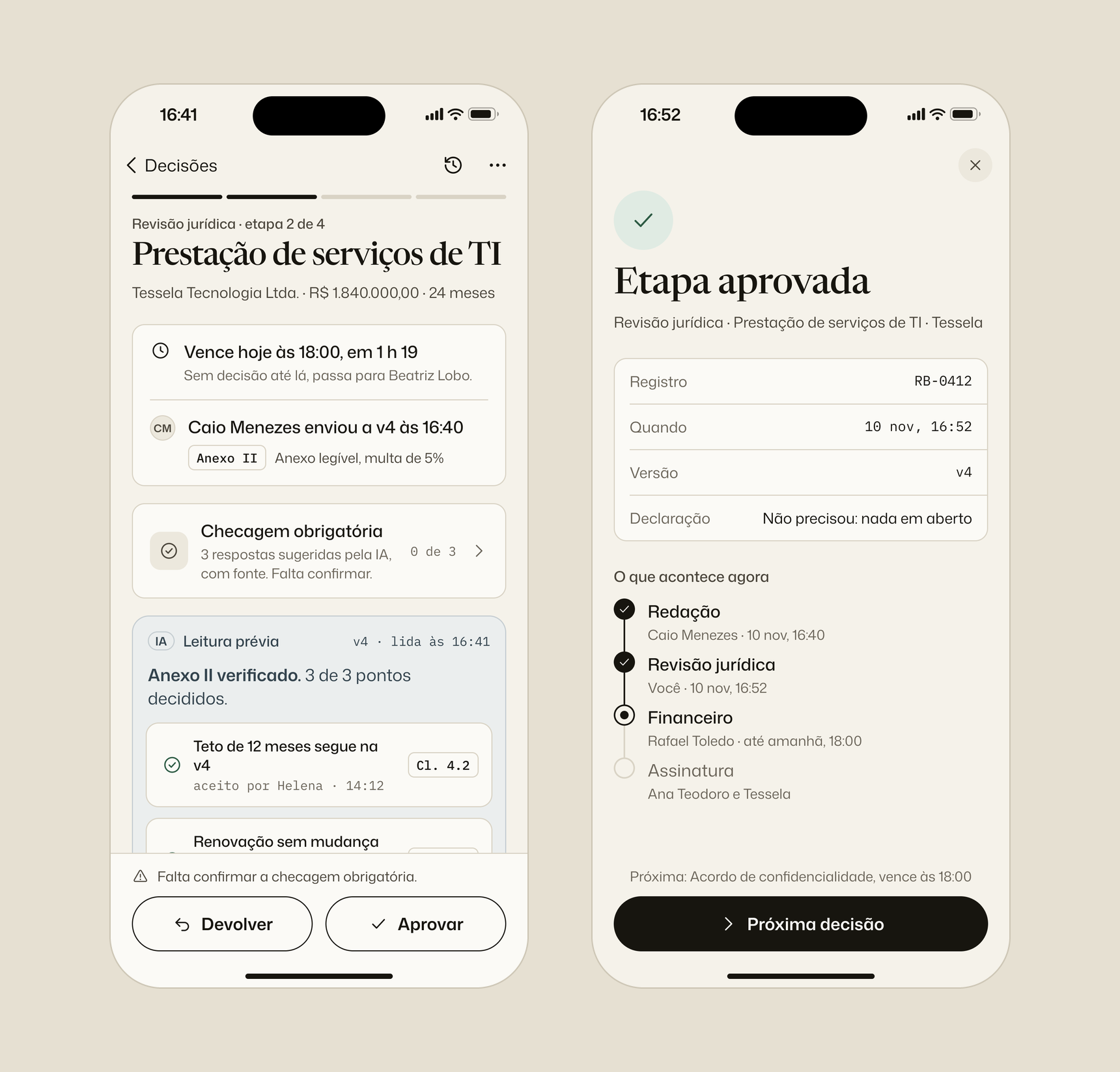
On the second visit the screen shows what was already decided and the one thing left.
Only the mandatory check is left. Its answers come suggested, each with a source, and a person confirms them. With nothing open, approving is one tap, and the screen says who comes next: Finance.
The same rules before and after the approval
One contract runs through all three flows. Days earlier, someone creates it from an approved template, and the AI fills the form from the supplier’s proposal. Each field says where its value came from.
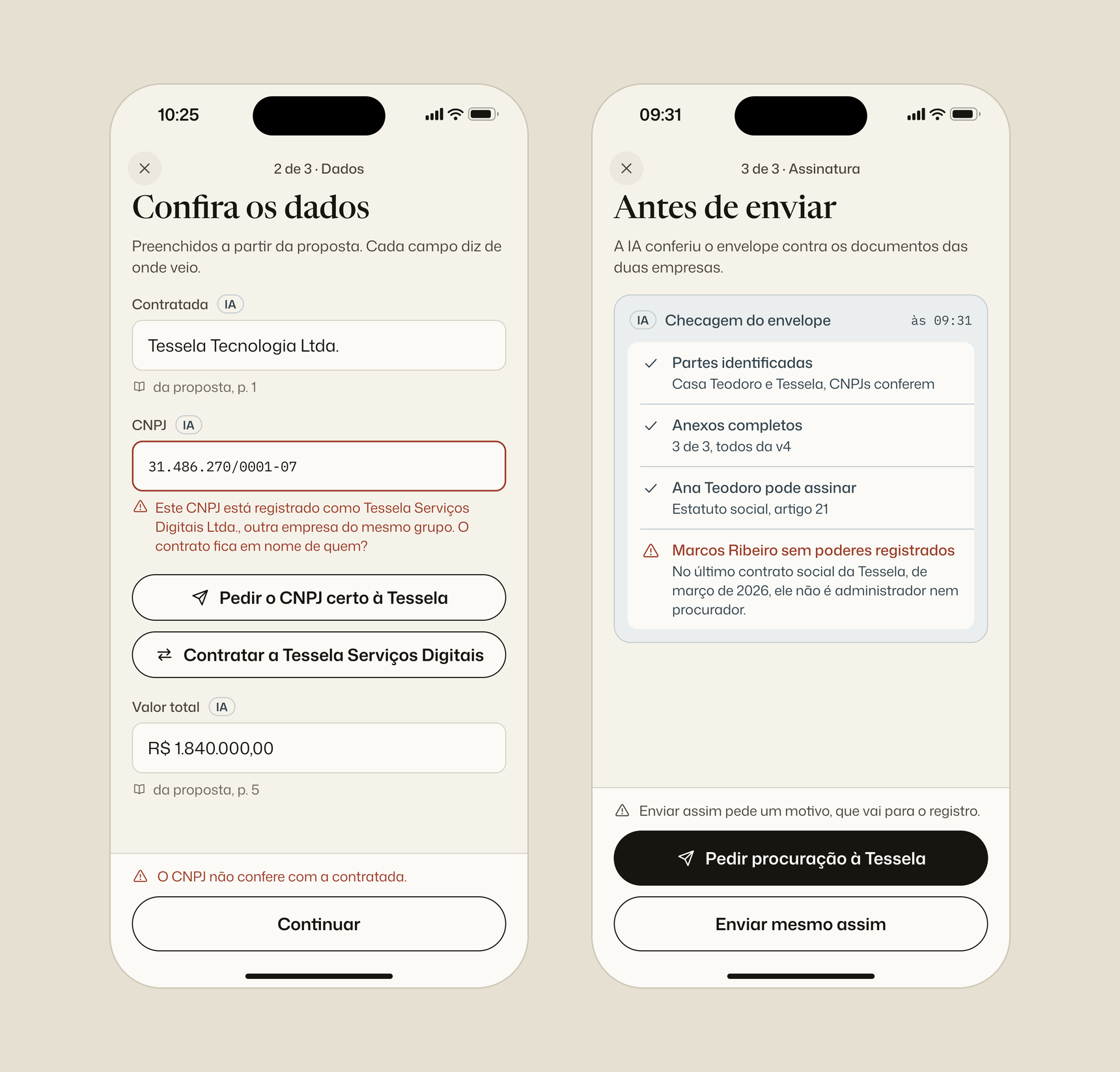
Before and after the approval, the AI still only checks and tells. A person picks what happens next.
When the tax number belongs to another company in the same group, the form stops and asks. The person creating the contract decides which one is right.
After approval, the contract goes out for signature. First the AI checks whether each signer has the power to sign, and says so when one doesn’t.
Every decision leaves a record
Each suggestion accepted, edited or refused becomes an entry: who, when, on which version and why. Reasons stay in the words of the person who wrote them.
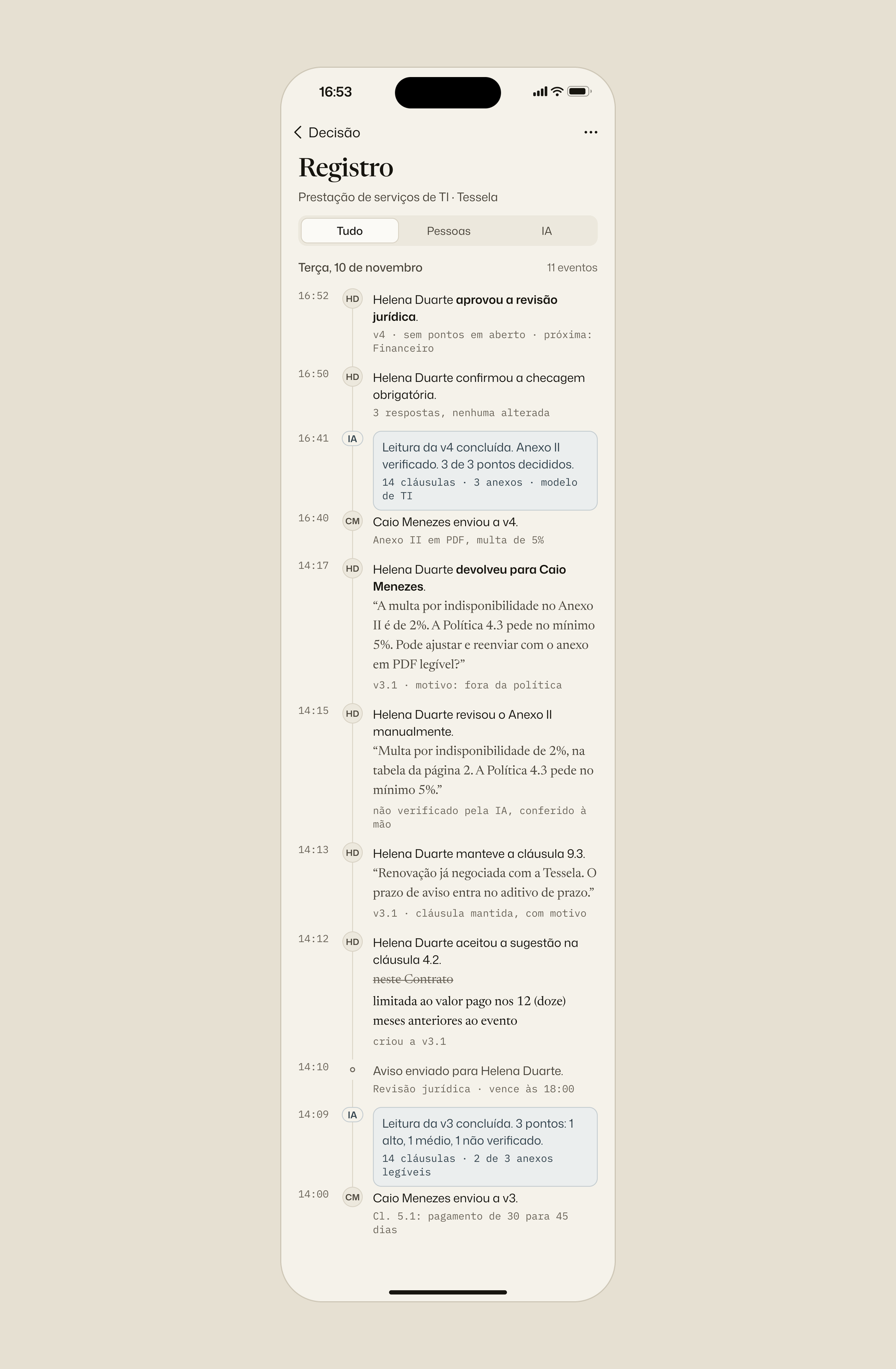
One Tuesday, eleven events. People’s reasons stay in their own words, and an AI event never reads as a decision.
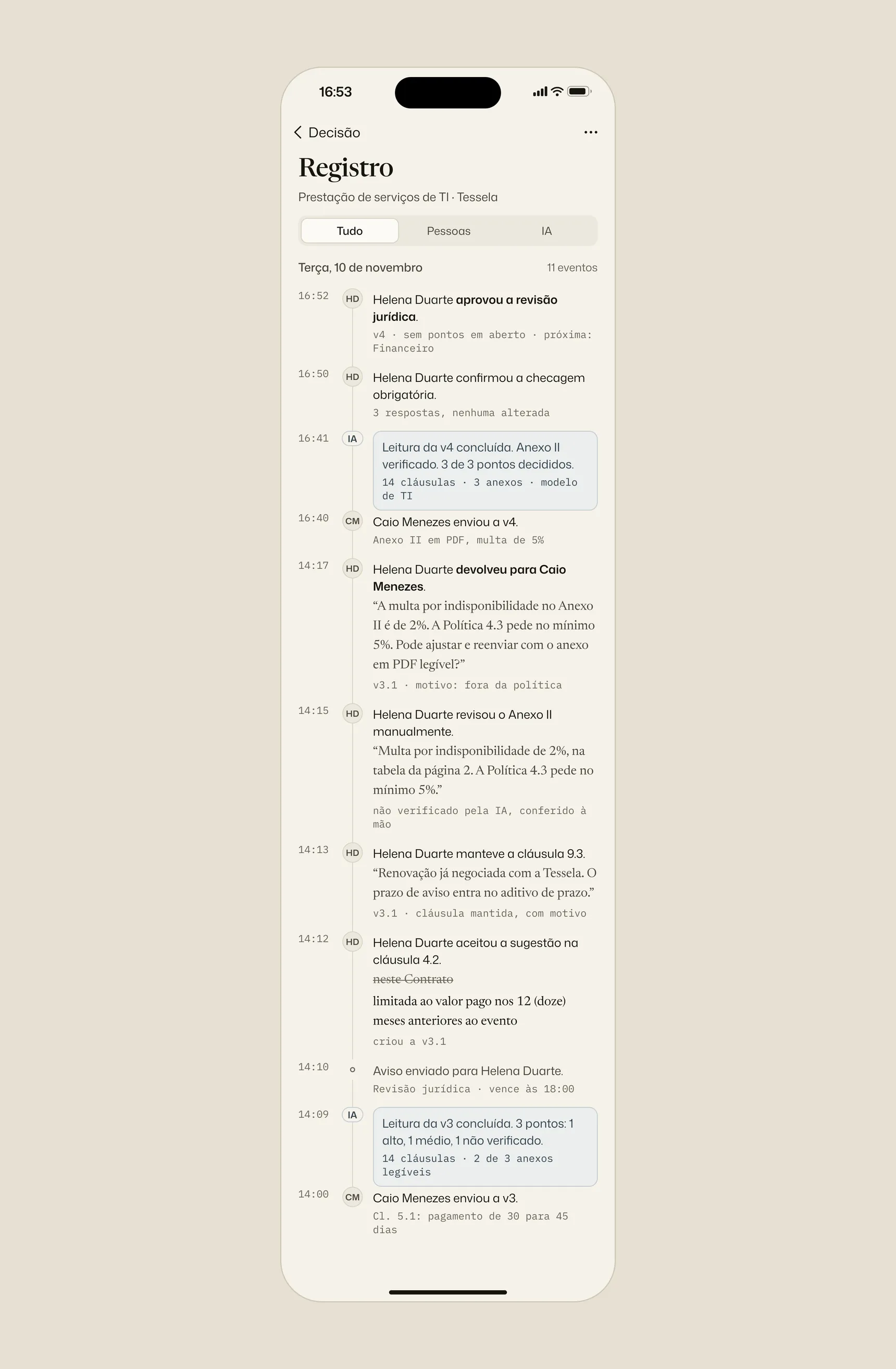
AI events are drawn differently from people’s, and an AI event never appears as a decision. In a legal product with AI, the record is the proof that a person decided.
How I would know it worked
Nothing here shipped, so there are no results to show. This is the plan I would run, with the alarm beside each good sign.
- Do people decide faster? I’d track time from notice to decision, by risk. It should fall on contracts with no high risk. If it falls on high risk ones too, that is a rubber stamp.
- Do people read before approving? I’d count the high risk points opened before approval. The alarm is a high risk approved without being read.
- Is trust calibrated? People should keep a clause against the AI more often at medium certainty than at high. Never is as bad as always.
- Does “I don’t know” help? I’d count the unverified items where the manual review found a problem. It has to be often enough to be worth the pause.
- Does the reading miss things? Every month, a lawyer rereads a sample of contracts approved with no points.
A plan like this only counts if it says what would make me go back. If fewer high risk points get read before approval, every open point starts to ask for a hold. If the reread finds a high risk the AI missed, the word “match” leaves the screen.
The next step is the conversation
The 14:10 decision already fits in a notice. The next step is to arrive where the person already is.
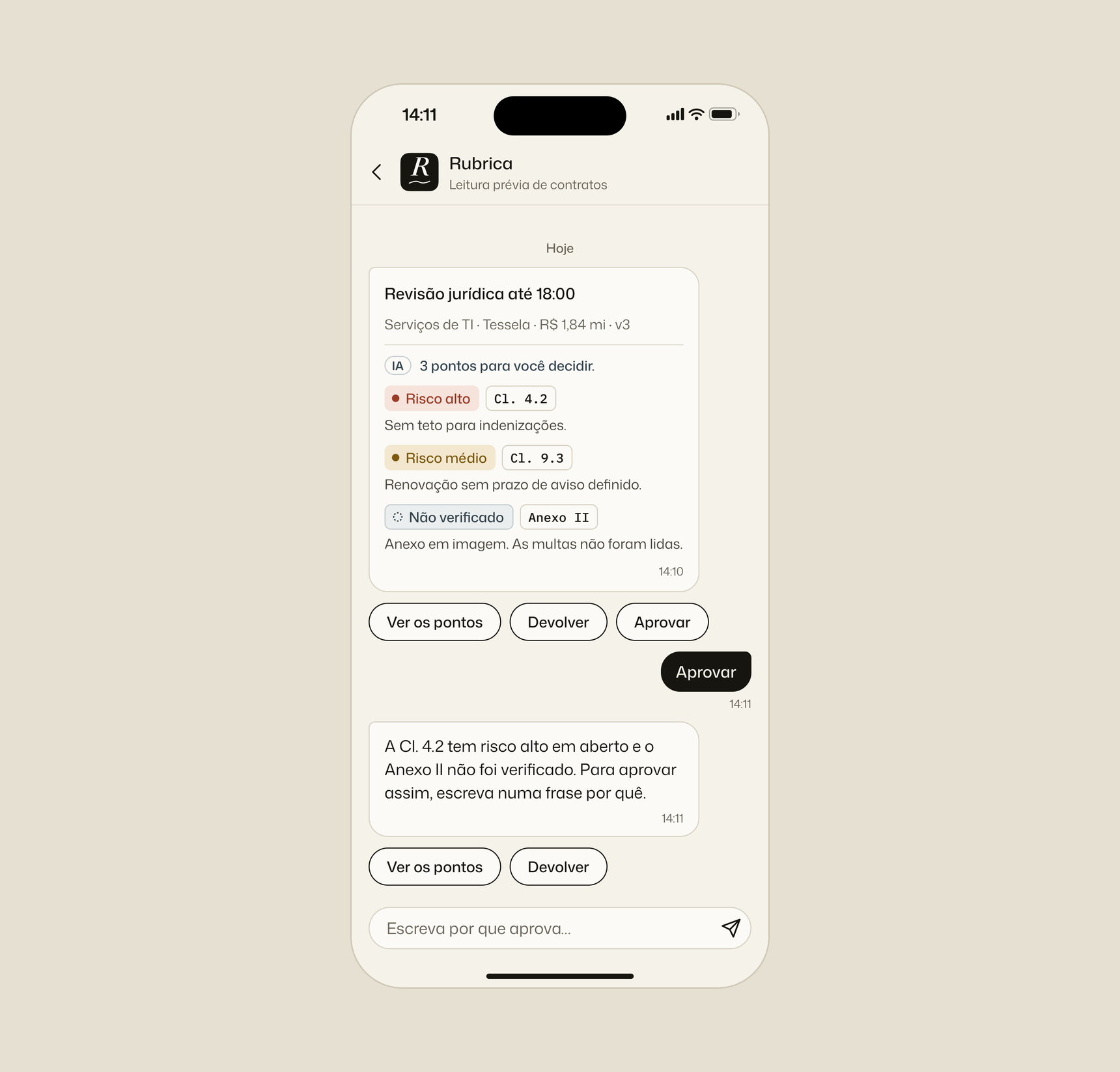
The same decision inside a conversation. The rules are the same: with a high risk open, approving asks for a reason.
I’ve long argued that approvals belong in the chat people already use. In a conversation the rules don’t change: the AI reads, and a person decides.
What I’d tell the next team
Design the disagreement first. If saying no to the AI is harder than saying yes, people say yes. In Rubrica, keeping clause 9.3 took one sentence.
Let the machine say “I don’t know”. The unreadable annex was the most useful point of that Tuesday. It sent a person to the one page that mattered.
Charge for risk, not for use. A hold on every approval is noise within a week. A hold that shows up only when risk is open still means something.
Questions about Rubrica
What is Rubrica?
It’s a concept of mine for approving contracts on a phone after an AI has read them. The AI points and explains. A person decides, and a risky yes takes more effort than a safe one.
How can an AI review tool avoid rubber stamp approvals?
I tied the effort to the risk. A clean contract takes one tap. With a high risk still open, approving takes a press and hold and a statement of what stays open. And disagreeing with the AI costs one sentence, so no is never harder than yes.
Why doesn’t Rubrica show a confidence percentage?
A percentage looks exact and gives you nothing to check. So certainty is a word, high, medium or not verified, with the reason under it. There is no low certainty. When the reading is weak, the AI steps back and says why.
What happens when the AI can’t read a document?
It says so. The item is marked not verified, with what it couldn’t read and where to look, and nothing is assumed. In the example, that note sent the reviewer to a scanned annex, where the penalty was below policy.
Why not block the Approve button when a contract has a high risk?
Blocking teaches people to tick “reviewed” without reviewing. So the button asks for more and never forbids: a press and hold, and a statement that goes to the record with a name, the time and the version.
Is Rubrica a real product?
No. It’s a concept I made in Figma in November 2026, with invented people, companies, amounts and clauses. It builds on what I learned designing mobile flows for contract software. Nothing shipped, so I show a measurement plan and no results.
How would you measure whether AI assisted approval works?
I’d track time from notice to decision by risk, how many high risk points get opened before approval, how often people keep a clause against the AI, and a monthly reread of contracts approved with no points. If high risk contracts get faster too, that is an alarm, not a win.